Thursday, May 10, 2012

How to set environment variables in Mac OS X Lion (For PHPunit purpose)

In my recent web application development, I need PHPUnit to run in my Macbook Pro Mac OS Lion X Lion. In my previous post I installed PHPUnit using PHP pear on XAMPP. 

Now I need to run it without evoking all the the path to the XAMPP bin files located at /Applications/XAMPP/xamppfiles/bin

So I need to set the environment variabel setting location in my Mac OS X Lion. We can do this with two easy steps.  

First: Open /etc/path files with terminal:

$ sudo vim /etc/path 

Second: Add /Applications/XAMPP/xamppfiles/bin to the bottom of the file. In my Mac, it look like this: 
/usr/bin
/bin
/usr/sbin
/sbin
/usr/local/bin
/Applications/XAMPP/xamppfiles/bin
~                                  

That's All

Wednesday, May 09, 2012

Installing PHPUnit on XAMPP Mac OS Lion


How to Install PHPUnit on XAMPP installed on Mac OS X Lion: 

First you need to add the phpunit channel: 

$ sudo /Applications/XAMPP/xamppfiles/bin/pear channel-discover pear.phpunit.de
Adding Channel "pear.phpunit.de" succeeded
Discovery of channel "pear.phpunit.de" succeeded

$ sudo /Applications/XAMPP/xamppfiles/bin/pear channel-discover pear.symfony-project.com
Adding Channel "pear.symfony-project.com" succeeded
Discovery of channel "pear.symfony-project.com" succeeded


Then Install Pear PHPUnit with the following command:
$ sudo /Applications/XAMPP/xamppfiles/bin/pear install phpunit/PHPUnitDid not download optional dependencies: phpunit/PHP_Invoker, use --alldeps to download automatically
phpunit/PHPUnit can optionally use package "phpunit/PHP_Invoker" (version >= 1.1.0)
downloading PHPUnit-3.6.10.tgz ...
Starting to download PHPUnit-3.6.10.tgz (118,595 bytes)
..........................done: 118,595 bytes
downloading YAML-1.0.6.tgz ...
Starting to download YAML-1.0.6.tgz (10,010 bytes)
...done: 10,010 bytes
install ok: channel://pear.symfony-project.com/YAML-1.0.6
install ok: channel://pear.phpunit.de/PHPUnit-3.6.10


References:
http://jeffreybarke.net/2010/08/how-to-install-phpunit-with-mamp/

Wednesday, October 19, 2011

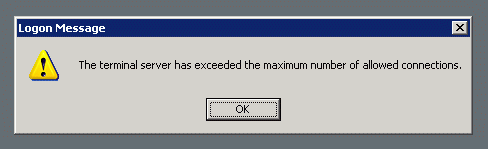
Mengatasi Masalah Logon Message "The terminal server has exceeded the maximum number of allowed connections"


Seringkali ketika kita mengakses Microsoft Windows Server secara remote, tulisan "The terminal server has exceeded the maximum number of allowed connections" muncul. Sehingga kita tidak bisa mengakses komputer tersebut secara remote, ini situasi yang tidak mengenakkan bagi Administrator yang mengandalkan Remote Desktop Connection untuk mengakses servernya.

Sebenarnya pesan itu disebabkan karena server membatasi koneksi remote yang aktif. Apabila pada saat kita melakukan Remote Desktop dan mengakhirinya dengan hanya menekan tombol close, tanpa melakukan logout terlebih dahulu. Maka Windows akan mencatat bahwa masih ada user yang terkoneksi. Dan jumlah koneksi inipun dibatasi jumlahnya.

Walaupun pembatasan dilakukan pada sesi Remote Desktop, pada sesi console banyaknya user yang melakukan remote tidak dibatasi. Oleh karena itu kita bisa melakukan trik berikut ini apabila terjadi masalah.

Klik Windows -> Run

Kemudian ketikan mstsc /v:00.00.00.00 /f -console

Dimana 00.00.00.00 merupakan IP address dari komputer yang anda ingin remote.

Perintah ini akan menggunakan sesi console untuk masuk ke dalam komputer yang anda remote dan setelah itu anda dapat membuka Terminal Service Manager untuk mereset user yang "nyangkut" tadi.

Selamat Mencoba!


Referensi:


Monday, April 11, 2011

Artikel Untuk Domainkeys di Zimbra

http://layangan.com/asfik/blog/2010/08/13/domainkeys-identified-mail-di-zimbra-postfix/

http://blog.pnyet.web.id/2010/03/17/improving-domain-key-di-zimbra.html

http://vavai.com/2010/12/22/implementasi-domainkeys-pada-zimbra-sles-11-sp1-menggunakan-opendkim/

Done!

Saturday, December 11, 2010

How To Install Nagios on Ubuntu 10.04


References:
  • http://library.linode.com/server-monitoring/nagios/ubuntu-10.04-lucid
  • http://www.ubuntugeek.com/nagios-network-monitoring-system-setup-in-ubuntu.html
  • https://help.ubuntu.com/10.04/serverguide/C/nagios.html